
Top 18 Codex Plugins for Marketers: B2B GTM Workflows
Abstract
What are Codex plugins for marketers?
Codex plugins for marketers are extensions that connect Codex, OpenAI’s coding agent, to the tools, data sources, and workflows B2B GTM teams use to plan, launch, measure, and improve marketing execution. The most useful plugins help marketers move work across real systems, including CRM, SEO/GEO research, content operations, landing pages, creative production, analytics, sales handoff, and campaign reporting.
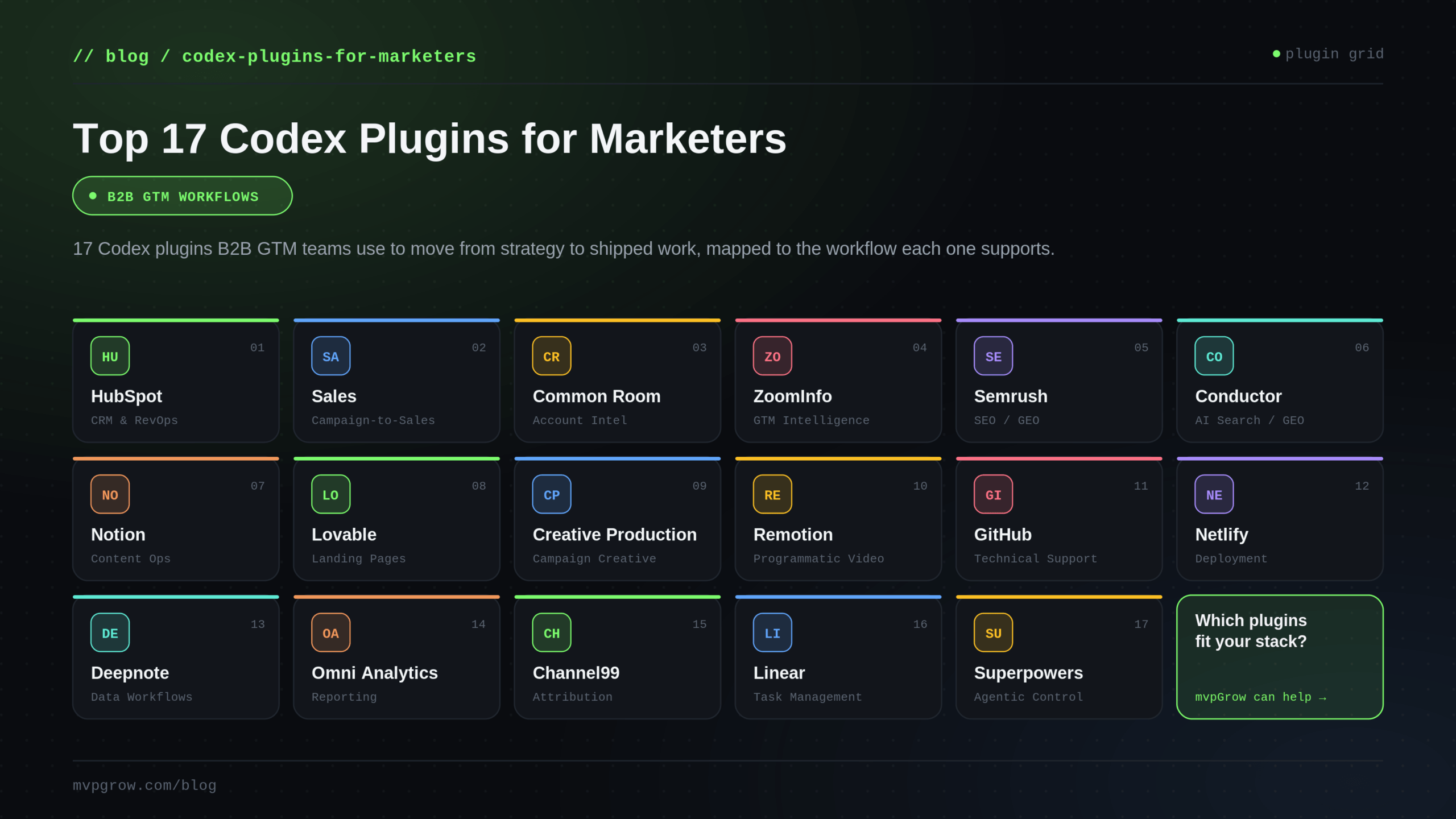
Top 18 Codex Plugins for Marketers Include:
- HubSpot
- Sales
- Common Room
- ZoomInfo
- Semrush
- Conductor
- Notion
- Lovable
- Creative Production
- Remotion
- GitHub
- Netlify
- Deepnote
- Omni Analytics
- Channel99
- Linear
- Superpowers
- Kollate
B2B go-to-market teams are under real pressure to turn campaigns into measurable pipeline faster. But the handoff from strategy to execution can still slow things down, especially when the work depends on technical systems, connected data, or another team to move it forward. A practical, yet unconventional, solution can be found in Codex plugins.
Codex is OpenAI’s coding agent, but its plugins extend it into the tools and workflows behind GTM execution. That makes it useful for marketers who need to ship, measure, and improve growth work without adding more operational drag. This functionality is part of the reason knowledge workers such as marketers now account for about 20% of Codex’s over 5 million weekly active users.
While Codex won’t replace your marketing platform, its plugins can help your team execute, measure, and improve GTM work with fewer operational gaps.
What is Codex, and what are Codex plugins?
First, let’s get clear on what Codex is. While both come from OpenAI, Codex is not the same platform as ChatGPT. Instead of an AI assistant, Codex is a coding agent built for software development. It helps users write, edit, test, debug, review, and understand code.
Codex is mainly used in developer workflows, including code editors, command-line tools, repositories, and cloud development environments. For GTM teams, the value comes from extending that technical execution layer into the tools and systems behind marketing operations.
Codex Plugins are add-ons that extend what Codex can do, and can include Skills, App Integrations, and MCP servers:
- A Skill is a reusable workflow or instruction set for a specific task.
- An App Integration connects Codex to an external app or workspace tool.
- An MCP Server gives Codex access to outside tools, data, or context.
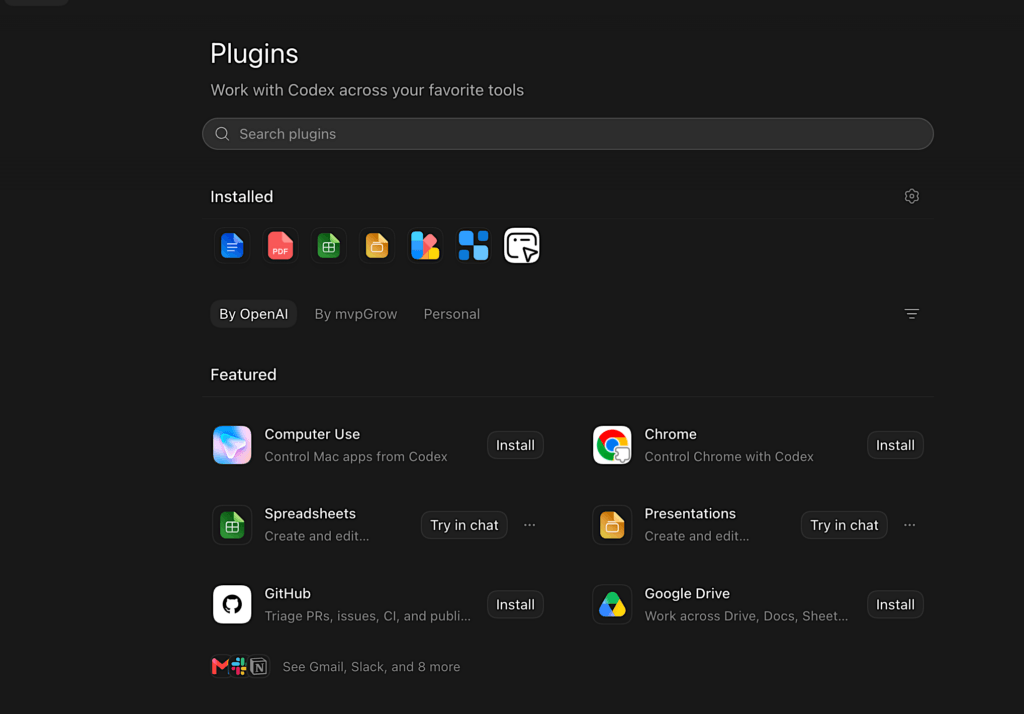
Codex Plugins are found in the Codex plugin directory. Users can browse curated plugins, shared plugins, and plugins created by their own team. In general, Codex plugins are built for developers, technical teams, and organizations that want repeatable Codex workflows.
What are Codex plugins for marketers?
“Codex plugins for marketers” is a use-case lens, and not an official product category. It refers to Codex plugins that may support marketing-related workflows, such as:
- Campaign execution
- CRM and RevOps workflows
- Account research
- SEO/GEO research
- Content operations
- Landing pages
- Website deployment
- Reporting and analytics
- Sales handoffs
- Internal knowledge management
Plugins are available that fit many standard marketing and GTM use cases, and offer connection with, or the functionality of, many widely used marketing tools. For B2B marketers, the practical question is whether a plugin helps ship, fix, measure, or coordinate work that supports campaign performance and pipeline growth.
Codex Plugins Are Not Traditional Martech
Codex plugins are not a new category of marketing software, and are not evaluated by the same criteria as a typical martech tool. A familiar app name does not necessarily make a plugin useful for marketers.
They also do not replace marketing strategy, positioning, content judgment, conversion planning, or performance analysis. They do not replace the systems GTM teams already use, nor do they remove the need for technical ownership when the work touches code, data, CRM records, reporting, or customer-facing pages.
The most common confusion is assuming that “for marketers” means “built for marketers.” In the case of Codex plugins, it means “potentially useful for marketing and GTM workflows.” The right plugin evaluation is whether it helps with a real workflow in your organization. Many teams find that Codex plugins can increase speed, efficiency, and output across marketing and GTM use cases when they are tied to the right systems and review process.
Key Terms
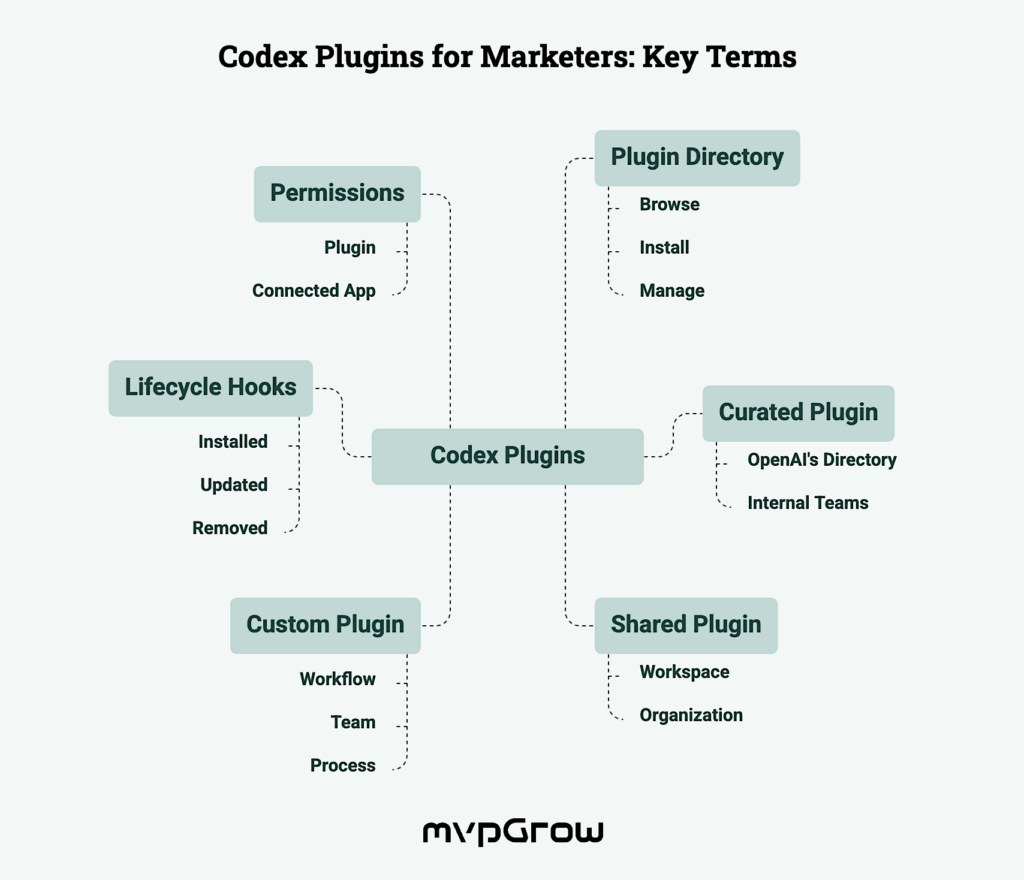
When evaluating Codex plugins for marketers, it helps to understand a few common terms beyond Skill, App Integration, and MCP Server. These include:
- Plugin Directory: The place where users browse, install, and manage Codex plugins.
- Curated Plugin: A plugin surfaced through OpenAI’s plugin directory rather than being built only for one internal team.
- Shared Plugin: A plugin shared inside a workspace or organization for team use.
- Custom Plugin: A plugin created for a specific workflow, team, or internal process.
- Lifecycle Hooks: Setup or teardown commands that can run when a plugin is installed, updated, or removed.
- Permissions: The access a plugin or connected app requires before Codex can use it.
Quick Look: Codex Plugins for Marketers by GTM Workflow
Each plugin in this table supports a practical GTM workflow, helping teams move from planning to execution with less friction.
| Codex Plugin | GTM Workflow | What It Helps With |
|---|---|---|
| HubSpot | CRM & RevOps | CRM records, pipeline visibility, tasks, and handoffs |
| Sales | Campaign-to-Sales Handoff | Account signals, follow-ups, meeting prep, and sales context |
| Common Room | Buyer & Account Intelligence | Account research, buyer signals, and prioritization |
| ZoomInfo | GTM Intelligence | Prospect research, contact data, and account insights |
| Semrush | SEO / GEO Strategy & Research | Buyer intent keywords, competitors, backlinks, traffic, and audience data |
| Conductor | AI Search Visibility | AI citations, search visibility, sentiment, and share of voice |
| Notion | Content Ops & Knowledge | Briefs, documentation, planning, and content workflows |
| Lovable | Landing Page & Web App Creation | Campaign pages, microsites, and lightweight GTM tools |
| Creative Production | Campaign Creative & Visual Asset Development | Campaign visuals, ad concepts, offers, and positioning assets |
| Remotion | Programmatic Video | Explainers, launch videos, captions, charts, and motion graphics |
| GitHub | Technical Marketing Support | Repos, PRs, CI, issues, and publish workflows |
| Netlify | Deployment & Web Ops | Previews, production deploys, redirects, forms, and releases |
| Deepnote | Data Workflows & Analysis | Notebooks, analysis, charts, and data workflows |
| Omni Analytics | Analytics & Reporting | Governed reporting, business definitions, and GTM metrics |
| Channel99 | Channel Performance & Attribution | Channel performance, spend efficiency, and attribution |
| Linear | Task & Execution Management | Issues, projects, campaign tasks, and execution tracking |
| Superpowers | Agentic Workflow Control | Planning, reviews, debugging, and workflow completion |
| Kollate | Organizational Prompt Knowledge Base | AI adoption, productivity, knowledge share, skill improvement |
How to Choose the Right Codex Plugins for Your Marketing Team
Choosing the right Codex plugin depends on how it needs to perform inside your team’s marketing workflows. Use these questions to shortlist the right solutions:
- Which marketing workflow is currently slow, manual, or dependent on another team?
- Does the plugin connect to a system your team already uses?
- Does the plugin expose the data or action you actually need inside Codex?
- Who owns the connected system: marketing, RevOps, sales, data, web, design, or engineering?
- What permissions will Codex need?
- Does the workflow involve customer data, account data, CRM records, analytics, email, or deployment?
- Who reviews outputs before they affect customer-facing pages, CRM records, reporting, or campaign performance?
- Does the plugin reduce operational drag, or does it add another tool to manage?
For B2B marketers, the highest-value plugins are usually the ones connected to real GTM workflows, such as CRM operations, search visibility, campaign execution, sales handoff, reporting, or technical implementation.
Top 17 Codex Plugins for Marketers
Here are the top Codex plugins for B2B GTM workflows, ordered around how teams typically move from customer and account context to planning, campaign creation, technical execution, measurement, and workflow management.
Plugins can be downloaded inside Codex in the Plugin directory. For reference, we have linked individual plugins to their repo at Open AI’s GitHub Repository where available; in the case of certain role-specific plugins created by Open AI, we provided a link that will open only in Codex.
It’s important to note that many of these plugins require the user to install or enable the plugin, authenticate the third-party service, and have the right account permissions in order to use it properly in a Codex workflow.
1. HubSpot

GTM Workflow: CRM & RevOps
HubSpot is the core RevOps and CRM plugin for teams using Codex to support campaign follow-up, pipeline movement, and customer record management. It lets Codex work with HubSpot CRM objects directly, including contacts, companies, deals, tickets, and engagements. With that context, Codex can help connect campaign activity to the records and workflows that support revenue execution.
Key Features:
- Includes: 1 App Integration and 4 Skills
- Search and update CRM records
- Review pipeline health and identify risky or stale deals
- Find missing, incomplete, or outdated CRM data
- Create follow-up tasks and support handoff workflows
- Prepare account, customer, or pipeline summaries
Best for: Marketing ops, RevOps, and GTM teams that use HubSpot as the shared system for campaign follow-up, lifecycle movement, and pipeline reporting.
2. Sales

GTM Workflow: Campaign-to-Sales Handoff
Sales is a Codex plugin for the workflows that happen after marketing creates interest and before revenue teams can act on it. It brings together the tools and Skills used to analyze account signals, prepare follow-up, enrich contacts, and support deal-related work. For marketers, the value is in making campaign-to-sales handoff cleaner and more actionable.
Key Features:
- Includes: 29 App Integrations and 19 Skills
- Analyze account signals and prioritize follow-up
- Build business cases and competitive briefs
- Enrich company and contact data
- Pull context from sales, meeting, email, CRM, and collaboration tools
- Support handoff work across tools such as HubSpot, Apollo, Clay, Outreach, Gmail, Slack, Notion, Google Drive, and Calendly
Best for: Demand gen, RevOps, and sales-aligned marketing teams that need to turn account engagement into better follow-up and cleaner sales context.
3. Common Room

GTM Workflow: Buyer & Account Intelligence
Common Room helps Codex work with buyer signals and account context. It is useful for GTM teams that need to understand which accounts are active, which contacts matter, and what signals should influence campaign or outreach priorities. That makes it a strong fit for signal-based marketing and sales alignment.
Key Features:
- Includes: 1 App Integration
- Research accounts and contacts
- Surface buyer signals and activity history
- Build prospect lists by industry, company size, tech stack, or location
- Filter contacts by segment, role, score, or website activity
- Identify ICP contacts engaging with key pages or communities
Best for: Growth, PLG, ABM, and sales-aligned teams that use buyer signals to prioritize campaigns and outreach.
4. ZoomInfo

GTM Workflow: GTM Intelligence
ZoomInfo gives Codex access to B2B company and contact intelligence for prospect research and account planning. It helps GTM teams find target accounts, identify decision-makers, and understand buying signals before campaign or outbound work begins. This plugin is useful when marketing needs better account context before creating or activating a segment.
Key Features:
- Includes: 1 App Integration
- Find target accounts by industry, region, and buying signals
- Build contact lists of relevant decision-makers
- Research companies and identify outreach hooks
- Support prospecting and account planning workflows
- Use verified B2B data to improve GTM targeting
Best for: Demand gen, GTM, and SDR teams that need stronger account and contact research before campaign activation.
5. Semrush

GTM Workflow: SEO / GEO Strategy & Research
Semrush connects gives marketers data-backed search and competitive intelligence without manually pulling reports from Semrush. It can pull structured SEO and traffic data, including domain analytics, keyword metrics, backlink profiles, traffic sources, competitor comparisons, geography, demographics, and market/audience insights. For B2B marketers, Semrush supports content planning, competitive research, and search visibility analysis.
Key Features:
- Includes: 1 App Integration, MCP-backed
- Pull keyword metrics and search volume data
- Review domain, backlink, and traffic data
- Compare competitor visibility and market position
- Analyze audience and traffic trends
- Support SEO and GEO research workflows
Best for: SEO, content, and growth teams that need search data to prioritize content marketing, technical SEO, and competitive opportunities.
6. Conductor

GTM Workflow: AI Search Visibility / GEO
Conductor is a search visibility and content intelligence plugin for traditional and AI search surfaces. It helps marketers review how their brand, competitors, and content appear across search results and AI-generated answers. For B2B GTM teams, that visibility can inform SEO, GEO, content planning, and brand positioning decisions before campaigns move into execution.
Key Features:
- Includes: 1 App Integration, MCP-backed
- Review search visibility and share of voice
- Benchmark competitors across search surfaces
- Analyze AI citations and brand mentions
- Review sentiment and visibility trends
- Use performance data to guide content and GEO strategy
Best for: Teams that need to monitor brand visibility, competitor movement, and content performance across both search engines and AI-generated answers.
7. Notion

GTM Workflow: Content Ops & Knowledge
Notion is a connected workspace for docs, wikis, projects, and team knowledge. The Notion plugin lets Codex search and update workspace content, create documents, synthesize research, capture decisions, and support planning tasks. For B2B GTM teams, it helps turn the planning and documentation layer into usable context for execution.
Key Features:
- Includes: 4 Skills, 1 App Integration, and MCP server
- Search and update workspace content
- Create briefs, planning docs, and research pages
- Capture decisions and meeting notes
- Organize content workflows and campaign documentation
- Turn workspace context into usable next steps
Best for: Content, marketing ops, and GTM teams that use Notion for planning, documentation, editorial workflows, and internal knowledge.
8. Lovable

GTM Workflow: Landing Page & Web App Creation
Lovable is a Codex plugin for creating web apps and websites from prompts. It can generate full-stack projects, check build status, return build URLs, and provide screenshots for review. For B2B GTM teams, it helps shorten the path between a campaign idea and a testable web experience.
Key Features:
- Includes: 1 App Integration
- Create full-stack web apps or sites from prompts
- Check build status and return build URLs
- Generate screenshots for review
- Support landing pages, microsites, and lead-gen tools
- Connect web creation work to Codex-supported GTM workflows
Best for: Growth, web, and technical marketing teams building campaign pages, lightweight tools, or early-stage GTM web experiences.
9. Creative Production

GTM Workflow: Campaign Creative & Visual Asset Development
Creative Production is an OpenAI Codex plugin for developing marketing visuals from a brief or product image. It brings creative direction, visual production, and campaign asset development into the same workflow where GTM teams are planning and refining their go-to-market work. Its advantage is that it can turn campaign direction into creative concepts and assets faster.
Key Features:
- Includes: 1 MCP server and 9 Skills
- Explore ad concepts and campaign directions
- Generate or polish visual creative
- Build mood board and logo directions
- Create social posts, offers and positioning angles
Best for: Brand, demand gen, and creative teams that need faster visual exploration and campaign asset development.
10. Remotion

GTM Workflow: Programmatic Video
Remotion is a React framework for creating videos with code. In Codex, it supports video workflows that include animation, timing, captions, audio, charts, and rendering. For GTM teams, the value is repeatability: teams can create structured video formats once and adapt them for launches, reports, product updates, and campaign variations.
Key Features:
- Includes: 1 Skill
- Create video compositions with React
- Add captions, audio, and timed visual sequences
- Generate animated charts and motion graphics
- Render videos through FFmpeg-supported workflows
Best for: Creative developers, content teams, and technical marketers that need repeatable video creation workflows.
11. GitHub

GTM Workflow: Technical Marketing Support
GitHub is a developer platform for hosting code, managing repositories, and coordinating software changes. For marketing teams, that can include landing page fixes, tracking updates, schema changes, content templates, campaign tooling, and web QA. It is useful when GTM work touches code and needs to move through review, CI, or publishing workflows.
Key Features:
- Includes: 2 App Integrations and 4 Skills
- Inspect repositories and review implementation context
- Triage pull requests, issues, and comments
- Debug CI and GitHub Actions failures
- Address review feedback
- Prepare and publish code changes
Best for: Technical marketing, web, growth engineering, and GTM engineering teams that need to ship code-backed campaign work faster.
12. Netlify

GTM Workflow: Deployment & Web Ops
Netlify is a platform for building, deploying, and managing websites and frontend applications. Its Codex plugin supports the release workflow for campaign pages, microsites, and web updates. For GTM teams, it helps keep publishing fast without turning previews, approvals, and production changes into a separate technical bottleneck.
Key Features:
- Includes: 12 Skills and 1 App Integration
- Deploy sites and return preview URLs
- Manage preview and production workflows
- Configure redirects, forms, functions, and environment variables
- Inspect deployment state and release status
- Support caching, edge functions, and image delivery workflows
Best for: Web, growth, and technical marketing teams responsible for launching campaign pages, microsites, and web updates.
13. Deepnote

GTM Workflow: Data Workflows & Analysis
Deepnote is a collaborative notebook platform for working with data. In Codex, it can run data workflows with agents, inspect and edit notebooks, and work with project context such as inputs and cached tables. This makes it a strong fit for marketers and analysts who need flexible analysis tied to real business questions.
Key Features:
- Includes: 1 App Integration and 5 Skills
- Run data workflows with agents
- Inspect and edit notebooks
- Review inputs, cached tables, and workspace context
- Create analysis outputs and charts
- Share notebook-based results with GTM stakeholders
Best for: Growth, analytics, RevOps, and marketing teams that need flexible data analysis beyond standard dashboard views.
14. Omni Analytics

GTM Workflow: Analytics & Reporting
Omni Analytics is a business intelligence platform for governed reporting and data analysis. The Codex plugin allows marketing teams to query approved metrics through the same semantic model, permissions, and business definitions used by the data team. It enables reporting consistency across GTM teams, sales, RevOps, and revenue leadership.
Key Features:
- Includes: 1 App Integration
- Query governed business metrics
- Use approved semantic models and definitions
- Preserve permission controls and row-level security
- Ask reporting questions inside Codex workflows
Best for: Analytics, RevOps, and GTM teams that need consistent reporting logic across marketing, sales, and revenue workflows.
15. Channel99

GTM Workflow: Channel Performance & Attribution
The Channel99 plugin connects Codex to real-time GTM intelligence for B2B marketing performance. It gives teams access to unified marketing data and insights across campaign performance, spend efficiency, audience engagement, and cross-channel attribution. With that unified view, teams can spend less time chasing reports and more time deciding which channels, audiences, and campaigns deserve attention.
Key Features:
- Includes: 1 App Integration
- Summarize campaign performance from Channel99
- Query unified B2B marketing data
- Review spend efficiency and audience engagement
- Analyze cross-channel attribution insights
- Ask strategic channel and budget allocation questions
Best for: Marketers, analysts, and business leaders who need faster answers about campaign performance, spend efficiency, audience engagement, and cross-channel attribution.
16. Linear

GTM Workflow: Task & Execution Management
Linear is an issue tracking and project management tool for product and engineering teams. The plugin lets Codex read, create, and update Linear issues and projects, so technical GTM work can stay connected to the execution systems teams already use. For marketers, Linear is most relevant when campaign pages, web updates, tracking fixes, or launch tasks need clear ownership and follow-through.
Key Features:
- Includes: 1 App Integration, 1 MCP Server, and 1 Skill
- Read, create, and update issues
- Manage projects and execution workflows
- Track campaign-adjacent technical tasks
- Summarize blockers and task status
- Coordinate work across product, engineering, web, and GTM teams
Best for: Technical marketing, growth, web, and GTM engineering teams that manage campaign execution through issue-based workflows.
17. Superpowers

GTM Workflow: Agentic Workflow Control
Superpowers is a plugin for planning, debugging, and delivery workflows for coding agents. It helps guide agent work through defined processes such as brainstorming, implementation planning, code review, and finish-the-branch workflows. For technical GTM teams, the value is more control over Codex agent work when it supports web, data, or campaign infrastructure.
Key Features:
- Includes: 14 skills
- Guide agent work through brainstorming and implementation planning
- Split independent work across parallel agents
- Execute written plans with review checkpoints
- Evaluate code review feedback before changes are implemented
- Support finish-the-branch workflows
Best for: Technical GTM, growth engineering, and web teams using Codex agents for implementation work that needs planning, review, and delivery controls.
18. Kollate

GTM Workflow: Prompt and knowledge management
Kollate provides a home for your prompts but also does so much more than that. With Kollate, you can improve the way you work with AI but with insights that are specific to the sessions (or as Kollate calls it – Conversations) you had. Kollate allows admins to see which employees are adopting AI faster and which employees need some help. For the employee, Kollate let’s them better understand how they can improve their prompt conversations mid conversation.
Key Features:
- Includes: 9 skills
- Organization of conversations per platform, project, tags, and the Skills and connectors being used
- Sharing conversations across the organization
- Conversation recording
- AI prompt assistant
- Version control
- Skill adoption leaderboard
Best for: Technical GTM, growth engineering, and web teams using Codex / Claude Code agents and are looking for more visibility into how work is done across their AI tools.
How We Selected These Codex Plugins
We reviewed these Codex plugins for marketers using the same criteria so you can quickly shortlist the best fit. Our evaluation is based on publicly available information as of 7 July 2026.
We selected these Codex plugins to show how B2B marketers can use Codex across real GTM workflows, not to rank every tool available in the plugin directory. The goal was to include one strong representative plugin per workflow where possible. Where a plugin felt useful only as a duplicate of another tool, we left it out.
What we reviewed:
- The plugin’s listing in the Codex plugin directory
- The plugin’s available skills, app integrations, MCP servers, or connected workflows
- Public plugin repository details, where available
- The documentation or positioning of the underlying platform it connects to
- The practical fit for B2B GTM teams
How we selected plugins:
- Workflow Fit: Does the plugin support a real GTM workflow?
- Codex Utility: Does it give Codex meaningful access to tools, data, context, or actions?
- GTM Relevance: Is the workflow useful for marketing, RevOps, growth, sales-aligned, or technical GTM teams?
- Actionability: Does it help teams move work forward, and not just retrieve information?
The final list is meant to show the types of Codex workflows that can support B2B GTM execution. Ultimately, in stack-dependent categories, the best plugin is usually the one connected to the systems your team already uses.
The GTM Workflow Question Behind Every Codex Plugin for Marketers
Codex plugins for marketers are most useful when they support a real GTM workflow. Their value is in helping teams connect strategy to the systems required to launch, measure, and improve campaigns. For B2B startups and tech companies, that work often depends on the GTM engineering layer between the plan and the pipeline.
As a full-lifecycle GTM agency for B2B startups, mvpGrow helps teams build that layer. We help companies move from first pipeline to scalable revenue by figuring out what needs to be built next, then turning it into the systems, workflows, and execution foundation required to support growth and pipeline impact. That includes leveraging Codex plugin-connected workflows to help GTM strategy become shipped work faster.
Book a call with mvpGrow to see how Codex plugins can support a GTM system built for your team.
Turn insights into pipeline.
Book a strategy call and we'll map your GTM gaps in 30 minutes.
Book a time