
Top 11 HubSpot Integrations for B2B Marketers in 2026
If you are running B2B marketing on HubSpot in 2026, you expect it to provide a dependable view of your prospects and customers as they navigate complex buying cycles. HubSpot now supports this with Breeze AI features that help score leads, update contact and company records, generate follow-up tasks, and summarize CRM information. But these capabilities depend on accurate information, and HubSpot can only act on the data it receives.
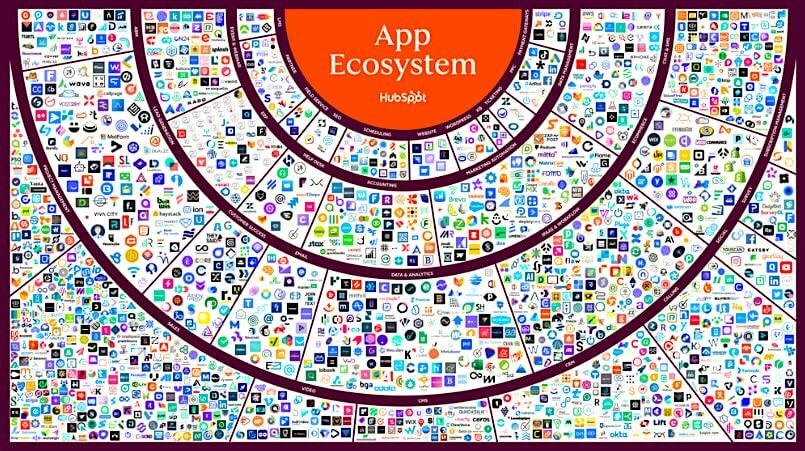
Fortunately, HubSpot’s marketplace now includes more than 2,000 integrations that move data between HubSpot and the other systems in your tech stack. These apps and APIs maintain data consistency across systems and give HubSpot a complete view of customer activity. They also strengthen reporting accuracy, while helping automation and AI operate reliably as your marketing efforts scale.
The question is, do HubSpot integrations work? With over 2.5 million active installs, the answer is clear: integrations play a central role in keeping HubSpot dependable and in improving the accuracy of the programs B2B marketers report ROI on. Let’s explore the top eleven HubSpot integrations that matter in 2026.
What are HubSpot integrations?
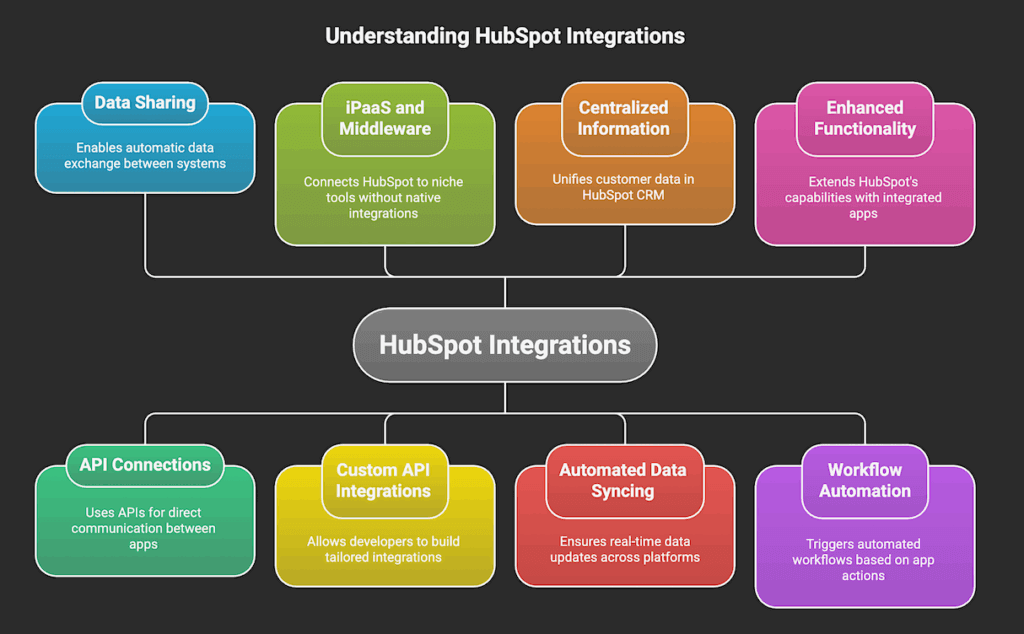
HubSpot integrations are connections between the HubSpot platform and other third-party software applications that enable data and functionality to be shared automatically. They allow businesses to connect their entire technology stack to HubSpot, which breaks down data silos, streamlines processes, and provides a unified, comprehensive view of the B2B customer journey.
Most HubSpot integrations allow different systems to “talk” to each other via APIs. Others are iPaaS (Integration Platform as a Service) or middleware tools that connect HubSpot to niche or industry-specific tools that don’t have native integrations. For situations involving complex internal business logic, developers can build custom API integrations from the ground up using HubSpot’s comprehensive API documentation.
For this post, we will use ‘app’ and ‘integration’ interchangeably. While the API (Application Programming Interface) is the underlying technical connection, the app is the specific software solution (such as Trendemon) that is integrated into the HubSpot platform.
The core functions of HubSpot integrations include:
- Centralized Information – Unifies critical customer data in the HubSpot Smart CRM, creating a single source of truth that aligns Marketing, Sales, and Service teams for predictable RevOps growth.
- Automated Data Syncing – Moving data in real-time between HubSpot and other apps to ensure all teams work with up-to-date information.
- Enhanced Functionality – Integrations extend HubSpot’s capabilities to those found in the connected app.
- Workflow Automation – Specific actions in one application can trigger automated HubSpot workflows.
HubSpot integrations are vital for B2B because they help marketers to maximize efficiency, make data-driven decisions, and scale operations effectively by leveraging their marketing tech stack inside the HubSpot ecosystem.
How to Choose the Right HubSpot Integration
Most API and iPaas/middleware apps are available in the HubSpot App Marketplace. HubSpot provides ratings, reviews, and detailed technical specifications for each app to help you conduct due diligence.
Here are some key considerations when choosing a HubSpot integration:
- First, for every critical data field, B2B leaders must define the Primary Source of Truth (PSOT) to establish clear conflict resolution rules (“Which app wins?”). This step prevents data corruption and misalignment across systems, a common challenge often managed through HubSpot’s Operations Hub.
- Map every required data field between both platforms to ensure technical compatibility and consistency.
- Review the app’s required security permissions to ensure the integration aligns with your organization’s technical security protocols.
- Review the total cost of ownership, which includes licensing for both the app and the necessary HubSpot tier, to ensure it aligns with your budget.
Finally, look for the “Built by HubSpot” badge for first-party tools that integrate easily, or the “HubSpot Certified App” badge, which signifies a third-party app that has met HubSpot’s highest standards for security and quality.
Top 11 HubSpot Integrations for B2B Marketers [by Category]
Account-Based Marketing (ABM)

1. Trendemon
Trendemon automatically orchestrates buyer journeys through your company’s website by allowing you to show different versions of your content, offers, and calls-to-action (CTAs) to different people, based on what you already know about them from their CRM record.
The app directly leverages HubSpot properties and contact lists to deliver real-time, personalized experiences that increase qualified lead generation from your existing website traffic. Crucially for B2B marketers, Trendemon connects content performance to deal analytics, allowing you to see exactly how specific assets influence the customer journey. It identifies Account-Based Marketing (ABM) intent signals to accelerate pipeline and revenue growth.
Review: “Every B2B company website needs Trendemon to direct people to the right places and provide guidance to content creators. Plus, it’s an easily integrated technology.”
Analytics & Data Management

2. Databox
Databox is a modern Business Intelligence (BI) solution that takes complex data from HubSpot and over 130 other software tools, then visualizes and analyzes these performance metrics in real-time. The integration pulls granular data from across your HubSpot portals—including Contacts, Deals, Marketing Email, and Workflows—and curates it into cohesive datasets.
These datasets allow B2B teams to easily prepare and merge raw performance metrics from multiple sources for deeper, more confident analysis. The platform provides interactive dashboards and AI insights that empower realistic, data-backed goal-setting and forecasting predictable growth trajectories.
Review: “Databox’s value proposition is that it allows you to create dashboards in minutes easily, efficiently, and cost-effectively. And that’s exactly what it does.”
3. Google Sheets Connector
Google Sheets Connector (not an official Google product) provides a robust, two-way sync for HubSpot data so that B2B teams can leverage Google Sheets as a control center for data management and analysis. It connects nearly all HubSpot objects (from Contacts and Deals to Custom Objects) to Google Sheets while automatically handling complex associations for comprehensive data sets.
B2B teams can save sophisticated queries for reuse and schedule automated refreshes hourly, daily, or weekly to ensure external reporting and dashboards are always in sync with the CRM. The integration also lets users create complex calculated metrics, such as weighted pipeline or custom lead scores, and push these values back to HubSpot properties for use in workflows and segmentation.
Review: “We used it to effortlessly sync data between HubSpot and Google Sheets, and it worked flawlessly.”

4. Insycle Data Management
Insycle automates the maintenance of HubSpot data and cleanses workflows for B2B teams to provide essential operational efficiency. It tackles critical data quality issues across all HubSpot data objects by using bulk operations for merging duplicates and standardizing record formats.
This tight integration allows users to embed customized data automation templates (aka “Insycle Recipes”) directly into HubSpot Workflows, which proactively prevents data errors at the point of entry before contacts enter important nurture streams. Crucially, Insycle provides a unified data quality layer that ensures all records entering or being processed within your HubSpot portal are clean and standardized, which is vital for precise segmentation and accurate reporting.
Review: “Insycle is the most effective tool in my toolbox to efficiently manage data in HubSpot.”
Automation

5. Line Item Assistant
The Line Item Assistant addresses the significant challenge of manually managing line items, which are the individual products, services, and associated costs attached to a HubSpot Deal. The integration offers powerful automation actions (including creating (single and bulk), updating, and deleting line items) that fit directly into HubSpot’s native Workflows tool.
The app features sophisticated filter logic which can be used to target specific line items and update any default or custom product property. B2B marketers can leverage filtering for clean segmentation and personalized communication campaigns based on specific product purchases or subscription details. Then they can drive customer retention and upsell identification by building high-converting post-sale sequences directly within HubSpot.
Review: “Best line item automation app in the marketplace by a long shot. (It) lets you do everything you need to, and can solve for some pretty complicated use cases.”

6. Integration Glue
Integration Glue provides a suite of nine powerful “Micro Apps” built specifically to integrate with the HubSpot ecosystem to solve common business problems and automate workflows:
- Workflow: Generate Code Actions automatically generates unique identifiers (like UUIDs), incremental codes, and various types of QR codes within HubSpot Workflows.
- DocMergy (Microsoft Office) automates the dynamic generation of personalized Microsoft Office documents (Word, PowerPoint, Excel) using data pulled directly from HubSpot records and properties.
- Workflow AI (ChatGPT) Actions integrates ChatGPT directly into HubSpot Workflows to automate tasks like data cleansing, data enrichment, sentiment analysis, and next-best-action recommendations.
- Mailgun Transactional Emails allows users to send crucial, non-marketing transactional emails with attachments from HubSpot Workflows that leverage Mailgun’s robust deliverability features.
- Workflow Access Actions provides the ability to bulk manage and automatically update the access permissions (Public, Private, Public No Index) for files stored in the HubSpot File Manager.
- Workflow Enrichment Actions enrich records by automatically copying associated user/owner details, extracting recent meeting data, or creating notes from other record properties.
- Workflow Calculation Actions performs advanced mathematical and date/time calculations directly within workflows, such as calculating the difference between two dates.
- Workflow Media Manager Actions automatically processes and optimizes media files from workflows, including resizing images, converting HTML to PDF, and splitting or merging PDFs.
- Workflow Association Actions automates the creation, deletion, and management of associations (relationships) between various standard and custom objects within HubSpot.
Review: “Awesome tool (Workflow Access Actions) to help us manage how files are served up inside HubSpot. Super easy to implement and great documentation!”
CRM Enablement & Process Adoption

7. Supered
To reduce the training burden on B2B teams, Supered provides HubSpot CRM users with in-app guidance that improves process adoption. The integration adds contextual prompts, walkthroughs, and on-screen instructions directly inside the HubSpot interface. It allows operations teams to standardize how reps follow CRM processes without relying on external documentation or ongoing shadowing.
The app maps these guided steps to specific objects and tasks in HubSpot so users can complete workflows correctly at the moment of action. Teams can reinforce lead qualification rules, deal management requirements, data hygiene standards, and any process that depends on consistent execution. The guidance adapts as processes evolve, which keeps teams aligned and prevents workflow drift. Supered creates a more reliable CRM environment by reducing user errors and shortening onboarding timelines.
Review: “Great software to support clients and the end-user of our portal setup with extensive process documentation, HubSpot how-tos, and data quality guidelines.”
Communication

8. Salesmsg SMS Texting & Calling
Salesmsg provides B2B marketers with a direct SMS and calling channel inside HubSpot that supports timely campaign follow-up. The integration enables two-way messaging from contact records and workflows, which helps teams respond when leads submit forms, register for events, or engage with high-value marketing content. All interactions are logged to the contact timeline, so engagement data remains complete and dependable for reporting.
Teams can build automated paths that send concise messages tied to HubSpot triggers and manage replies through shared inboxes that keep communication organized. Salesmsg also supports local numbers and simple media attachments, which help teams tailor outreach to specific regions or programs. These capabilities let B2B marketers create faster, more relevant touchpoints that guide leads through early engagement stages and keep HubSpot reporting aligned with real activity.
Review: “Super simple, clean interface that works great with HubSpot. (It) makes lead capture and real-time text engagement effortless!”
Email Marketing

9. NeverBounce
NeverBounce strengthens HubSpot email performance by verifying addresses before they move into active campaigns. The integration checks new contacts and existing lists to identify invalid or risky emails that can damage deliverability. It helps B2B marketers preserve their sender reputation and keep engagement metrics reflective of real audience behavior.
The integration also runs a quick list analysis that estimates bounce risk and groups each address by status. These results sync back into HubSpot, which allows marketers to build cleaner segments and remove contacts that distort campaign performance. NeverBounce provides additional indicators of list health so teams can assess the quality of their database before major sends. It creates a more dependable email channel and helps marketers trust the data they use for reporting and optimization.
Review: “We were able to easily clean up and segment our distribution lists with just a few clicks.”
Lead Generation

10. AccountScout
Only available at its website, the AccountScout integration is a lead enrichment tool that attaches firmographic data to every new company that enters HubSpot. This data gives teams an immediate sense of account fit, which clarifies the quality of inbound activity and improves how early-stage leads are evaluated. B2B marketers gain a clearer view of which campaigns attract companies aligned with their ICP and where follow-up should be concentrated.
AccountScout also enhances the company records already stored in HubSpot so marketers have dependable information when building audiences for acquisition efforts. Updated firmographic details make it easier to identify accounts that match strategic priorities and show real potential for progression, which leads to more deliberate outreach and clearer signals about which segments are responding to ongoing programs.
Review: “AccountScout delivers what I need most: accurate company enrichment without any complexity.”

11. Surfe
Surfe connects LinkedIn prospecting to HubSpot by pulling profile information, contact details, and company data into the CRM with a single action. Marketers can add a new contact from LinkedIn or update an existing one, and the app fills the mapped HubSpot fields with the information available on the profile. Teams achieve a consistent record from the moment a prospect is identified, helping lead generation efforts stay aligned with ICP criteria.
The integration also sources verified emails and phone numbers when they are not visible on the profile, which improves reachability for outbound campaigns. Surfe can even sync LinkedIn message history to the contact so you can see how the first exchange unfolded, and evaluate interest with more confidence. It also lets teams push lists from LinkedIn or Sales Navigator into HubSpot in batches, which supports more scalable prospecting workflows.
Review: “Seamless LinkedIn integration that efficiently syncs new contacts and updates CRM data.”
Get the Most Out of HubSpot Integrations with mvpGrow
HubSpot integrations enable B2B marketers to fully leverage the platform’s vast capabilities and provide the data that allows its AI enhancements to work optimally. But knowing exactly which ones to set up, and how to do it, might be biting off more than you can chew, especially if you’re a lean startup or a lightly-resourced marketing department.
That’s where partnering with a HubSpot Platinum Solutions Agency like mvpGrow can make a real difference. We have extensive experience in automating and optimizing HubSpot operations for B2B marketing teams in the SaaS and tech industries. Our expert teams use GTM engineering strategies to tie everything in your tech stack together with the latest AI tools and most effective HubSpot integrations so that you can get maximum ROI from your HubSpot investment.
Get a free personalized demo today to discover HubSpot workflows that fuel growth and drive results.
Turn insights into pipeline.
Book a strategy call and we'll map your GTM gaps in 30 minutes.
Book a time